

Generate logo variations instantly from your primary logo.
One of the most requested features from Sinqlo users is finally here. Today we’re introducing the Sinqlo AI Assistant (Beta pre-launch), a new tool that automatically generates logo variations from your primary SVG logo.
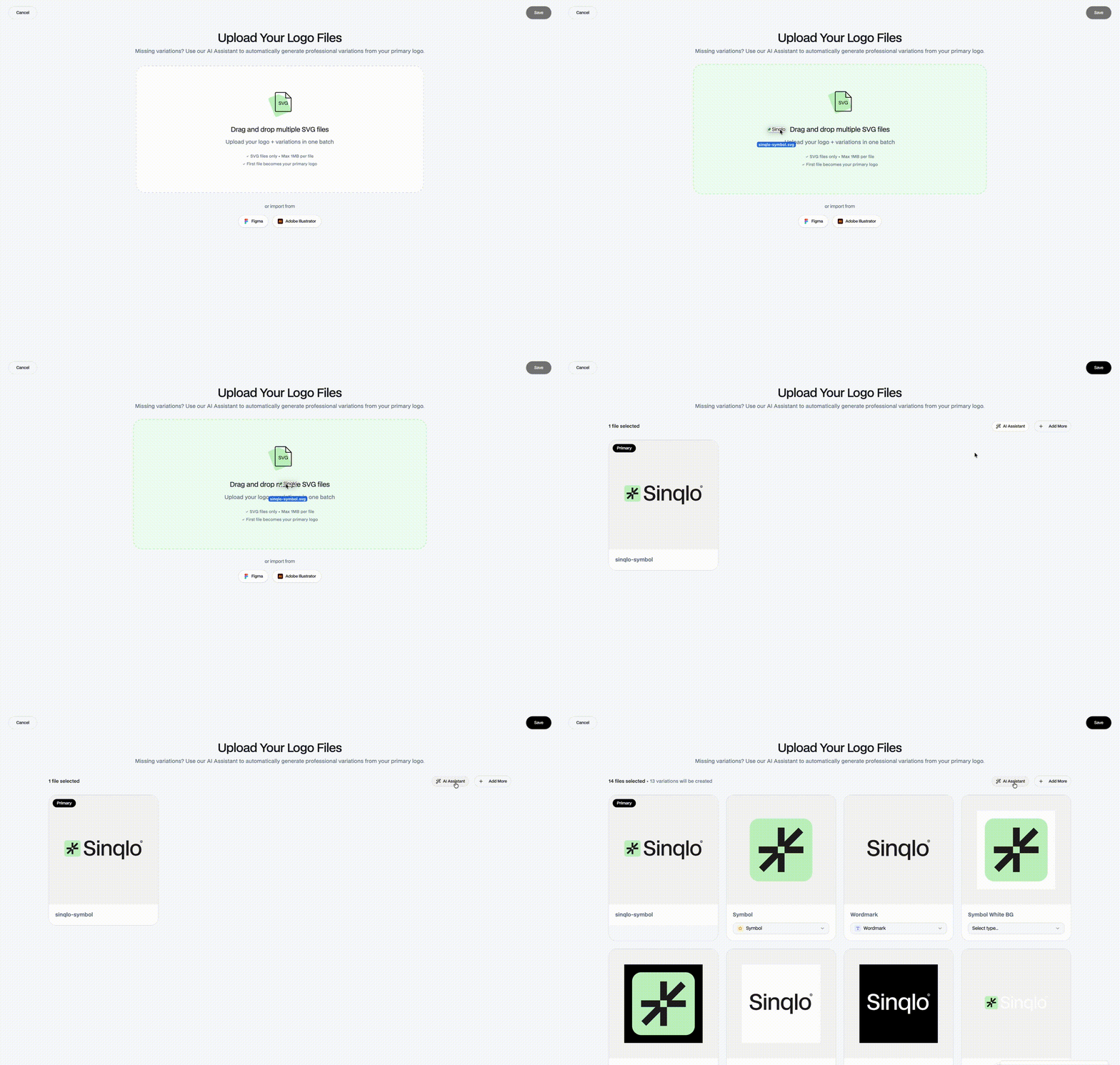
Designers and studios often deliver a logo system that includes multiple versions: horizontal, stacked, icons, simplified marks, and more. Creating these variations manually takes time and usually happens after the project is already finished. The Sinqlo AI Assistant is designed to simplify that process. Upload your primary logo SVG, and Sinqlo will generate structured variations automatically — ready to be included in your brand kit and shared through your Smart Brand Link.
From one logo to a complete system
With the AI Assistant, Sinqlo analyzes your primary logo and generates common variations used across branding systems.
These may include:
- Symbol or icon extraction
- Horizontal logo versions
- Stacked logo versions
- Social media marks
- Simplified versions for small sizes
All generated files are organized automatically within your brand environment, making them immediately available for teams and clients.
Built for designers and studios
Logo systems often evolve after delivery. Clients may later request additional formats for digital use, social media, signage, or small-scale applications. Instead of reopening design files and exporting new versions manually, Sinqlo helps designers generate these variations instantly while keeping everything structured in one place. This makes brand management simpler, faster, and more scalable.
How AI logo variations work
The Sinqlo AI Assistant analyzes the structure of your primary SVG logo and generates alternative layouts based on common branding patterns. Because the system works directly with vector SVG data, it can understand the relationships between shapes, symbols, and typography inside the logo. From there, the AI can automatically create variations such as symbol extraction, horizontal layouts, stacked versions, minimal icon marks, and simplified marks for small sizes. The goal isn’t to redesign your logo, it’s to help expand your logo system quickly and efficiently. Designers remain in control of the final selection while Sinqlo handles the repetitive structural work.
Why this matters for brand systems
Modern brands rarely rely on a single logo. A complete identity system usually requires multiple variations for different contexts such as websites, social media, packaging, small-scale applications, and digital interfaces. Creating and managing these versions manually can become repetitive and time-consuming. The Sinqlo AI Assistant helps designers extend a logo into a full system faster while keeping all versions organized inside the brand environment.
Seamlessly integrated with Smart Brand Links
All generated logo variations are automatically added to your Sinqlo Smart Brand Link, ensuring that teams and clients always have access to the latest files.
No outdated folders.
No expired transfer links.
No repeated requests for logo files.
Everything stays organized inside the brand environment.
What’s coming next for Sinqlo AI
The AI Assistant is only the beginning. Sinqlo is exploring new ways artificial intelligence can support designers and studios in managing brand assets more efficiently. Future capabilities may include automatic brand asset organization, color palette extraction and expansion, typography detection, AI-assisted brand kit generation, and smarter logo file optimization for web and print. Our goal is to make Sinqlo the smartest environment for managing and sharing brand systems.
Available now (Beta)
The Sinqlo AI Assistant is currently available as a Beta pre-launch feature, and you can start using it today. Even better, the feature is completely free for all Sinqlo users. Simply upload your primary SVG logo or open an existing brand to start generating variations.
Help us improve it
The AI Assistant is just the beginning of how artificial intelligence can simplify brand management workflows.
If you try the feature, we’d love to hear your feedback.
Please email us with your feedback at info@sinqlo.com