Product

No more ZIP chaos. No more outdated files. Sinqlo turns your SVG into a polished, shareable hub of logo assets, so you deliver faster, look sharper and keep clients happy.

product-page-image

What Makes Sinqlo Fun

(and Ridiculously Useful)
lightning-icon
Auto Logo Asset Packs

Drop in one SVG → boom. You get a ZIP with PNGs (web + socials), PDFs (print), WebP and pristine SVGs.

flag-icon
Team Collaboration That Doesn’t Suck

Add teammates and assign roles. Everyone’s synced, no drama.

Features

upload-image upload-image upload-image

Upload Workflow

Drag, Drop, Done

A clean, streamlined upload page built for speed. Drag, drop and let the system process assets instantly.

  • Simple, focused upload screen
  • Automated asset conversion (PNG, PDF, WebP, optimized SVG)
  • Auto-detection of brand colors
  • Designed to get you from upload → share link in seconds

Dashboard

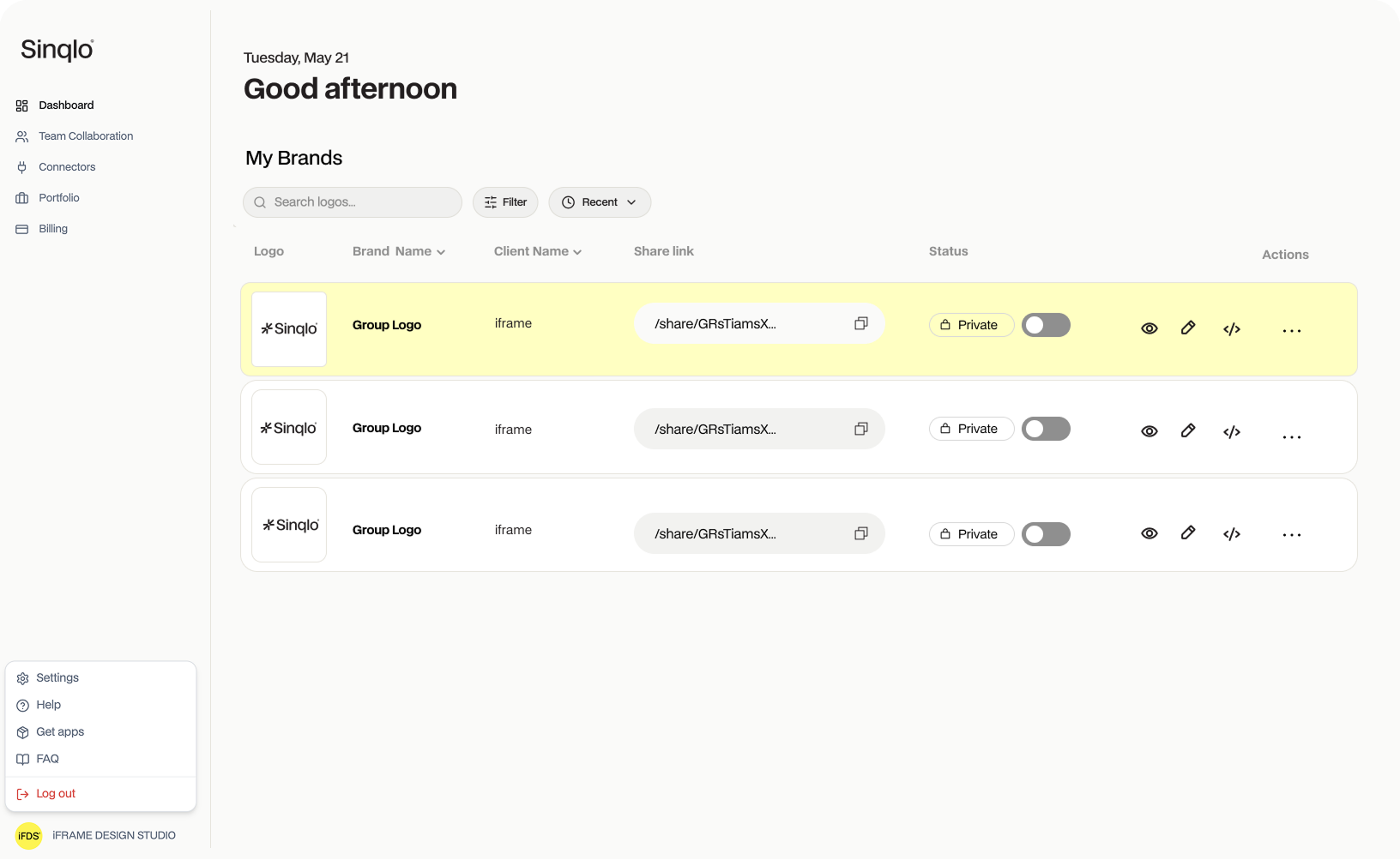
All your client logos, neatly organized in one place

  • Centralize every client’s logos in one hub
  • Grid or list view, tailored to your workflow
  • Search & filters to locate assets in seconds
  • Sorting by client name or project date
  • Pagination built for large portfolios
  • Upload limits & upgrade prompts built in

For designers, it means no more hunting through folders just click, share, done.

dashboard-image dashboard-image

How it works

Upload, Share, Download

Upload your logo and variations.
Sinqlo converts your SVGs to every format instantly
the moment you hit download, ready for clients, printers, or web.

Secondary

Monogram

Primary Logo

Horizontal

Favicon

small-ellipse-icon
big-ellipse-icon
row-line

Add Variation

SVG

PNG

WEBP

PDF

SHARE LINK

DOWNLOAD

user-icon

Team mode on.

Same logos. Same updates. Total sync.

*Available for Studio & Agency plans.

team-mode-image-left-top-2

Shared workspace

All teammates see the same logos, variations, and updates, always synced.

team-mode-image-right-top

Real-time alignment

When one person uploads or edits, everyone instantly sees the change.

team-mode-image-left-bottom

Permissions & Roles

Assign who edits and who only views. Control stays with you.

team-mode-image-right-bottom

Team Invitations

Add collaborators instantly with secure invites.

and more

Centralized brand management

One shared library per client, no duplicate files, no version confusion.

Faster Sharing

Designers, account managers and clients stay on the same page, literally.

Scalable

Perfect for multi designer teams working on multiple brands or projects.

Profile

Manage your account and make it feel like yours.

  • Upload avatar
  • Edit profile info (name, about, social links)
  • Control portfolio visibility
  • Team collaboration settings
  • Change password & manage account security
  • Delete account (with clear warnings)
profile-image profile-image
portfolio-image

Portfolio

Showcase your logos in a public portfolio page. Share work, attract clients, build trust.

  • Public portfolio pages at / portfolio / yourname
  • Client name display
  • Structured data for search engines
  • Social links (Instagram, LinkedIn, Behance, X, Website)

Why You'll Actually Use It

use-group-image siqlo-image-orange

Because your time is better spending designing, not digging through “final_v8_REALthisTime.ai”.

  • SVG first pipeline → pixel-perfect quality, zero hacks.
  • Live Brand Kits → palettes, fonts, logo variaitons and always current.
  • One Link Sharing → branded, secure, QR-friendly.
  • Client proof → previews that make sense, files they can’t mess up, no logins required.

FAQ

Is my data locked into Sinqlo?

Never. We don’t believe in lock-ins. Sinqlo uses open formats (SVG, PDF, PNG, WEBP) so you can move your assets freely between tools or back them up offline.

Will I lose access to my projects if I cancel my plan?

No, your projects stay safe. After canceling your plan, you’ll still have read-only access for 90 days to view and export your work. After that period, your workspace will be archived, but you can restore everything instantly by reactivating your subscription.

Can I export my data anytime?

Yes. Your data always belongs to you. You can export your logo files, brand kits, and client assets at any time, even if your subscription is paused or canceled.

How does Sinqlo help my design studio / agency deliver faster?

Sinqlo replaces ZIP chaos, email chains, and endless resends. Upload once, and deliver all formats with a single branded link. Clients self-serve their assets, saving your team hours on back-and-forth.

Can my team collaborate on logo projects?

Yes. On the Studio and Agency plans, invite teammates, assign roles and manage logos together in one shared workspace. Designers, PMs and account leads stay aligned on every client project.

What is the Brand Kit?

It’s Sinqlo’s signature feature. Upload a single SVG, and we instantly extract the brand’s color palette. You can then add fonts (with license links), attach external resources like photo libraries or logo source files, and publish a live, always up to date Brand Hub your clients can trust.

No more outdated folders or lost links, just one source of truth for every brand you deliver.

Do clients need an account?

No. Clients simply click your secure link, preview assets, and download the right files. No logins or tech hassle.

What file formats can i deliver?

From one SVG, Sinqlo auto-creates a complete asset ZIP: PNG (web & social), PDF (print), WebP and optimized SVG. Every variation, ready instantly.

How secure is Sinqlo?

Enterprise grade encryption and encrypted share links with granular access controls keep your files protected at every step.

Can I cancel anytime?

Absolutely. No contracts, no hidden fees. Cancel whenever you like, and your account stays active until the end of the billing cycle.

How are subscriptions and payments handled?

All subscriptions are managed securely through Stripe. You can choose monthly or annual billing and adjust plans as their workload grows. You’ll always see a clear breakdown before you pay and you can cancel anytime without penalty.

Why is packaging a logo such a pain and how does Sinqlo fix it?

Packaging a logo is slow, manual, and repetitive, exporting every format, color version and file type by hand.
Sinqlo automates all of it. Upload one SVG and it instantly generates every export, color variation and client ready file in seconds. What used to take hours now takes a click.

What happens when I update a file?

Your Brand kit updates automatically, no re uploads, no new links. Every client always sees the latest version.

Is Sinqlo only for logos?

No, it’s built for logos first, but easily scales to handle brand assets as illustrations.

Does Sinqlo support my existing workflow?

Absolutely. Upload any logo or brand file and Sinqlo handles format conversion, previews and color extraction automatically.

Can Sinqlo replace my shared folders or Drive links?

Yes, it’s designed to be your smarter, branded alternative to cloud folders, built specifically for design teams.

Why do designers and studios love using Sinqlo?

It saves hours on exports, client revisions and file hunting. One link, all formats, beautifully presented.

What makes Sinqlo different from traditional logo sharing?

Stop sending ZIPs, wetransfer and Dropbox links. Sinqlo turns every logo handoff into a polished brand experience.

Ready to Transform Your Logo Delivery?

Join designers who have streamlined their workflow with Sinqlo.

Try Sinqlo for free
Sinqlo
Privacy Overview

This website uses cookies so that we can provide you with the best user experience possible. Cookie information is stored in your browser and performs functions such as recognising you when you return to our website and helping our team to understand which sections of the website you find most interesting and useful.