Prototype in Any Client's Brand Kit With AI and DESIGN.md
Your team can now build a landing page prototype, a set of social posts, or a first look at a brand identity in a client’s real brand in the time it takes to write a prompt. Sinqlo turns every brand kit into a DESIGN.md file: one text file with the client’s logos, colors, fonts, spacing, and rules. Hand it to Claude, ChatGPT, or Cursor and the first draft already looks like the client, not like a template.
Key takeaways
- Every brand kit in Sinqlo comes with a DESIGN.md. Nobody on your team has to write it.
- Give it to any AI agent and prototypes come out in the client’s colors, type, and logo from the first prompt.
- We used one DESIGN.md to make a landing page, two social posts, and an event identity set in a single session. The images are below.
- It holds the details that usually get lost: which color is for buttons, which logo goes on dark backgrounds, the client’s own do’s and don’ts.
- It sits on the same sharing page as the logos, so your client’s developers and freelancers get it too.
Why studios hand every AI agent a DESIGN.md
AI agents are fast at layout and bad at brands. Ask for “a landing page for our client” and you get something polished in a purple gradient and a font the client has never used. Then someone on the team spends the next hour fixing colors by hand, which wipes out the time the agent saved.
Most studios patch this the same way. Someone pastes a few hex codes into the chat, forgets the accent color, types the font name from memory, and attaches a screenshot of page 12 of the guidelines PDF. It half works. The next designer opens a new chat and starts the whole thing over.
A DESIGN.md does all of that in one go. Drop it in, and the agent knows the client’s palette, type, logos, and rules before it draws anything. Your team gets to argue about the idea instead of the hex codes.
What Sinqlo’s DESIGN.md gives your team
Nobody on your team writes it
You already built the brand kit when you delivered the logos. Sinqlo reads that kit and writes the DESIGN.md for you, for every client, in seconds. Ten clients means ten files, and nobody on the team typed a line.
The real logos go into the mockup
Every logo variation is listed with a permanent link, so the agent can place the actual logo in the mockup. Because variations are named (“Vertical, White”, “Symbol, One Color”), it knows which version goes on the dark hero and which one goes in the favicon.
Colors come with instructions
A list of hex codes doesn’t tell an agent what to do. Sinqlo’s file gives each color its role and a line on how to use it: the primary color for key surfaces and buttons, the accent sparingly for highlights and calls to action, backgrounds for backgrounds. That’s the difference between a page that uses the right colors and a page that uses them in the right places.
Type, spacing, and corners are spelled out
Fonts come with weight, size, and line height. Layout values like button radius, card radius, the spacing unit, and max page width are spelled out too. Those are exactly the details agents make up when nobody tells them, and the reason two AI-built screens rarely look like they belong to the same brand.
The client’s rules travel with it
Whatever you wrote in the kit’s brand rules (“never put the logo on the orange”, “headlines in sentence case”) goes straight into the file. The agent reads them as instructions.
It stays current
When the client updates their logo or adds a color, you update the kit once. The next download has the change, the logo links already point to the new version, and agents connected to Sinqlo directly read the live kit every time.
It’s safe for private work
For private kits, the file lists logos by name only, with no download links. You can share it with a freelancer without handing over the files.
Your client gets it too
The DESIGN.md sits on the brand kit’s sharing page, next to the logos, with Download and Copy buttons (see how it works). When the client’s in-house developer or next agency opens their AI tool, the brand is already there. Nobody emails you asking for the hex codes.
What it looks like for a real client
We built the TechFuse kit in July 2026 for a tech and culture conference in Ioannina, Greece, mainly to get 24 logo variations to the organizers and their printers. Here’s part of the DESIGN.md Sinqlo wrote from that kit:
## Colors

| Role | Name | Hex | RGB |
|------|------|-----|-----|
| primary | Color | #3D009A | rgb(61, 0, 154) |
| secondary | Color | #FFFF5A | rgb(255, 255, 90) |
| secondary | Color | #82FFBE | rgb(130, 255, 190) |
| secondary | Color | #FFB4FF | rgb(255, 180, 255) |
| neutral | Color | #FFFFFF | rgb(255, 255, 255) |

### How to use the colors
- Color `#3D009A`: main brand color, for key surfaces and primary buttons
- Color `#FFFF5A`: supporting elements and secondary actions

## Typography

| Font | Usage | Weight | Style |
|------|-------|--------|-------|
| Bandeins Strange | h1 | 400 | normal |
All 24 logo variations are in the full file, each with its own link. Give this to Claude and you get the deep ultraviolet, the neon yellow, mint, and pink in supporting roles, and headlines in Bandeins Strange, with no back and forth.
What we made from one DESIGN.md
To see how far it goes, we took the TechFuse file and asked Claude for three things a studio gets asked for every week. Everything below came out of one session on October 13, 2026. We did one round of fixes on the landing page and the identity set (mostly headline sizes) and left the rest alone.
A landing page prototype
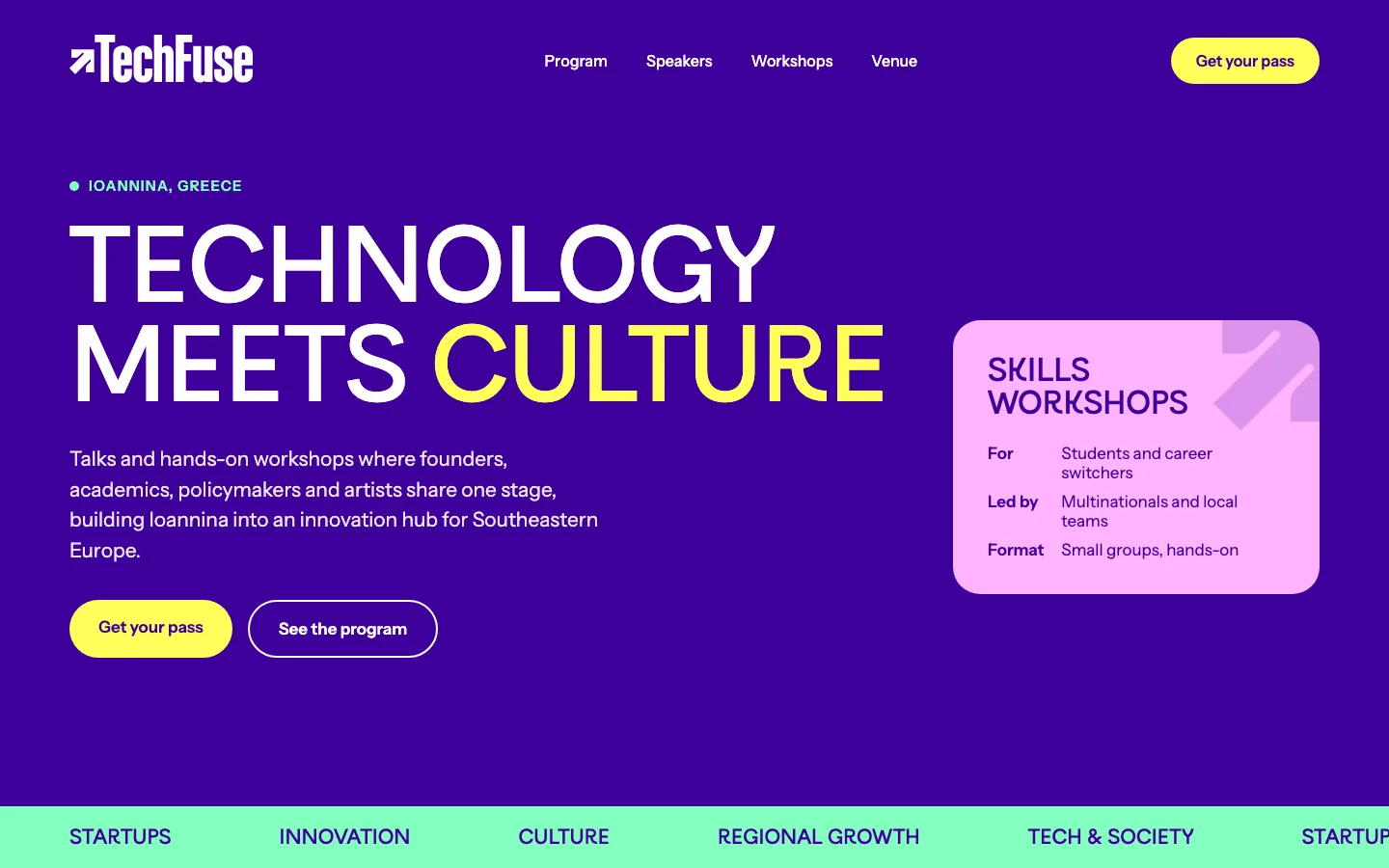
We asked for a landing page for the conference. Claude used the primary purple as the page, kept the yellow for the buttons and the key word in the headline, and gave the mint and pink supporting jobs, which is exactly how the DESIGN.md describes the roles. The logo is the real white wordmark from the kit, not a text placeholder.
The headline is set in Bandeins Strange, the brand’s actual font. It’s a licensed typeface, so it only shows up because the font is installed on our machine. On a computer without the license, you’d see a fallback font in its place. The kit had no body font, so Claude picked one on its own (Instrument Sans). That’s the kind of decision you want the kit to make instead.
This is the part that changes pitches. Setting up a file, finding the right logo, and matching colors by hand is the slow, boring start of every mockup. Here Claude did that part, and we went straight to judging the idea.
Social posts that are almost ready
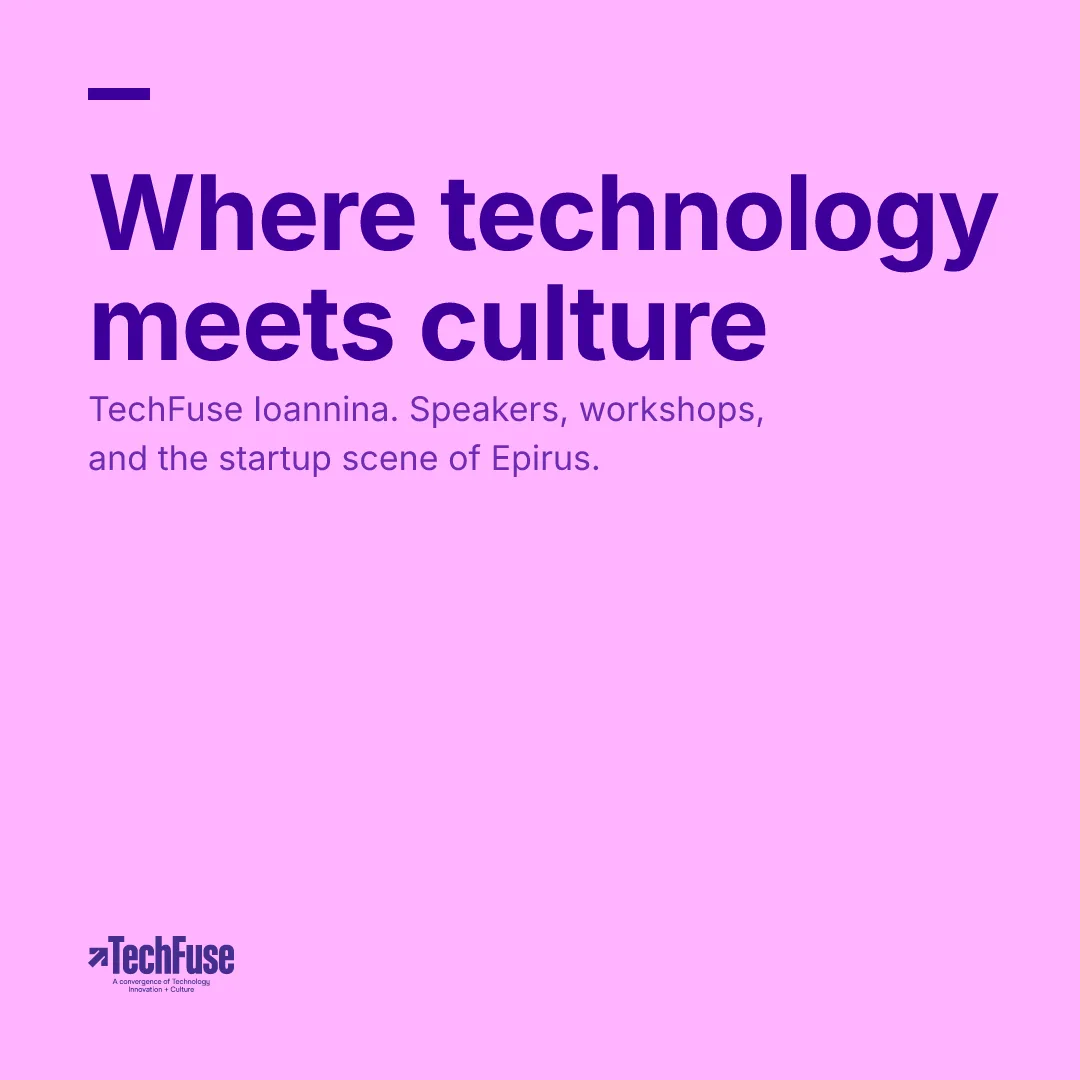
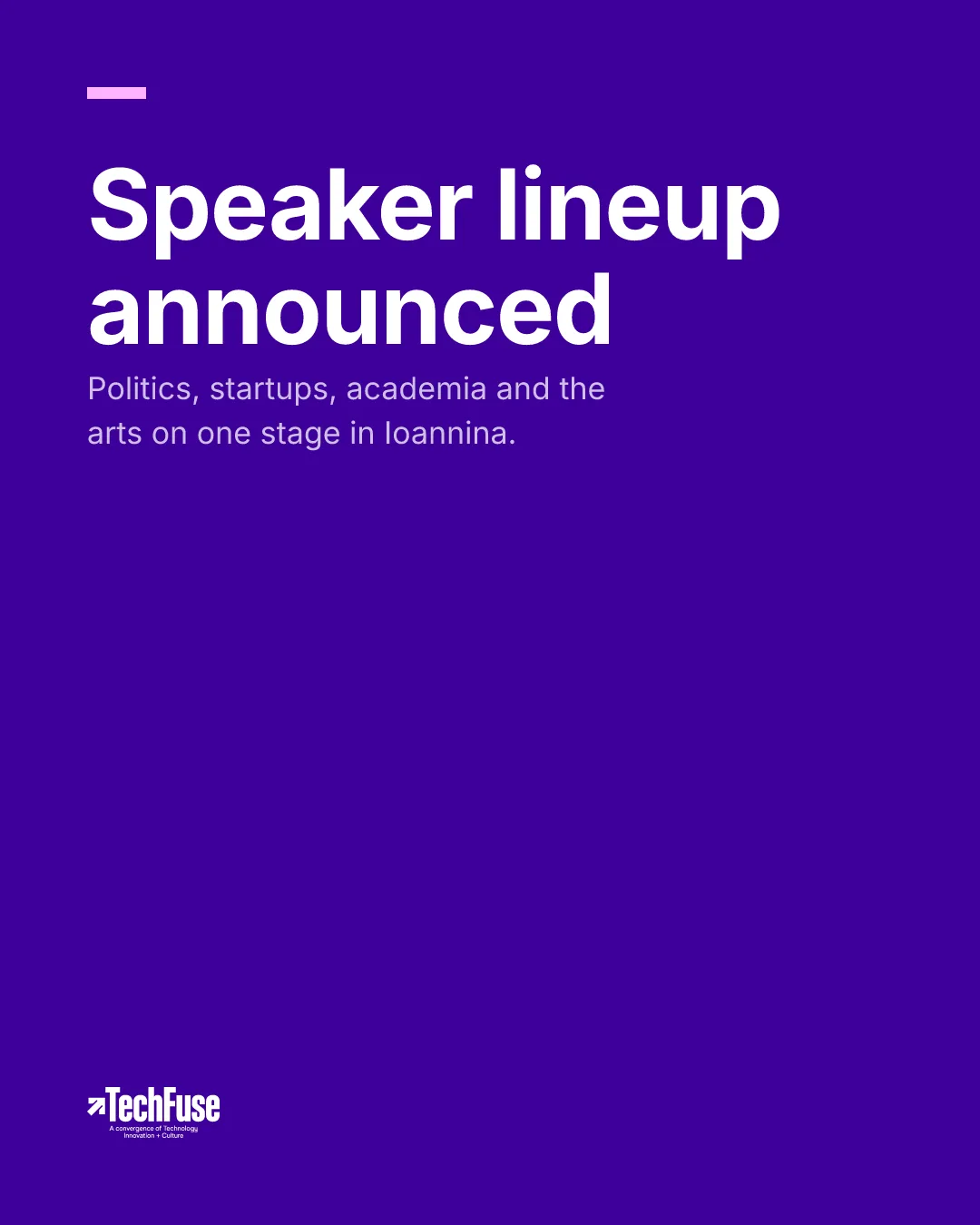
With Claude connected to Sinqlo, you can ask for a social post and get a finished image back: the right size for Instagram, TikTok, YouTube, or a link preview, a background from the brand palette, and the logo variation that works on that background (the purple wordmark on pink, the white one on purple). We asked for a square post and a portrait announcement and had both in under a minute.
We call them almost ready because they are. The headlines came out in Inter, since a licensed font like Bandeins Strange can’t be used on the server. Add the real font, a photo, or the speaker’s face, and they’re ready to schedule. For a weekly content calendar, that’s most of the work done.
A brand identity set
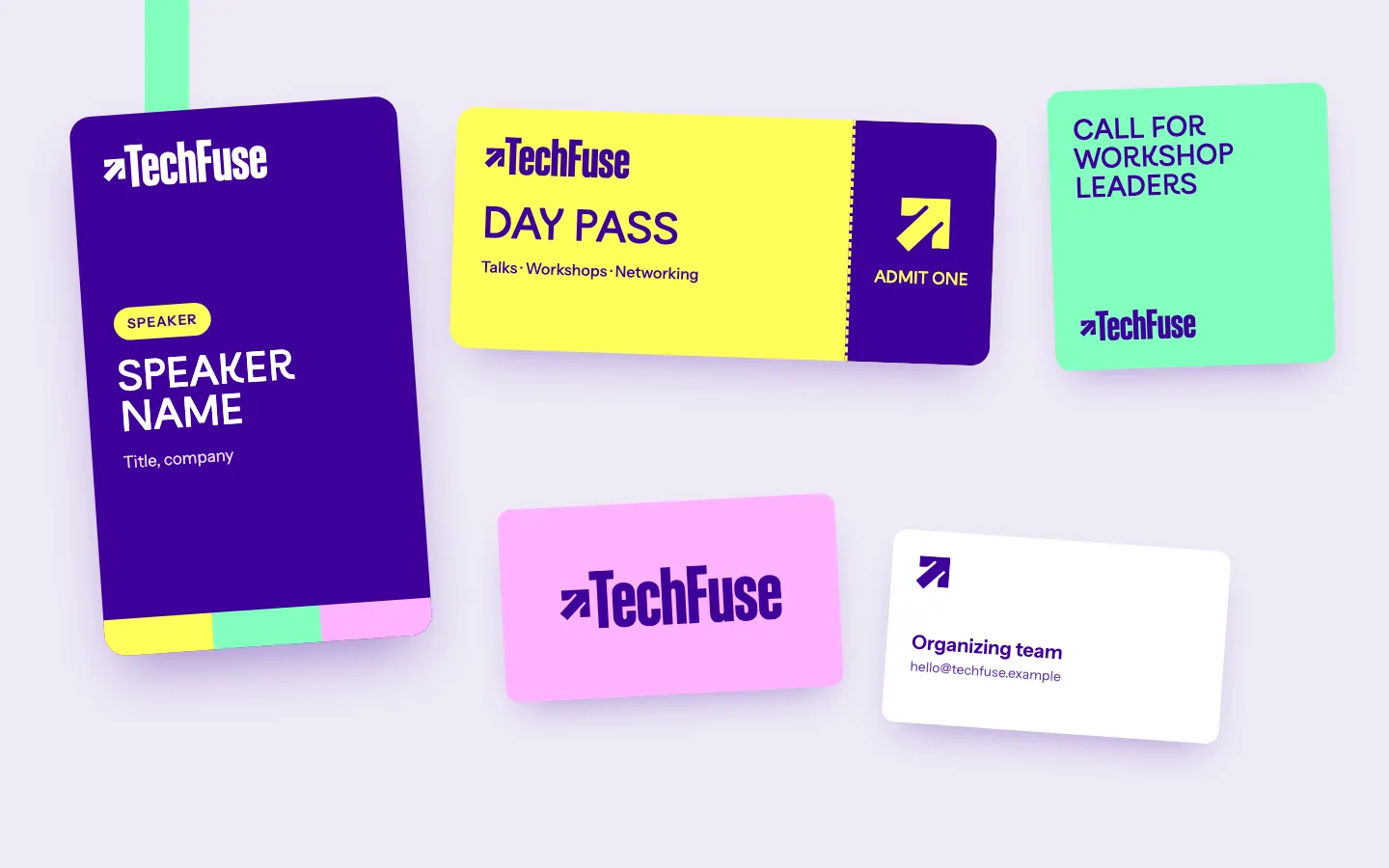
Then we asked for the event basics: a speaker badge, a day pass, a business card front and back, and a social tile. Every piece uses the kit’s colors in its own roles, the full wordmark where there’s room, and the symbol alone where there isn’t, like the ticket stub and the back of the card.
You still need a designer here. The badge needs a real print spec, and the ticket is begging for someone with taste to push it further. But as a starting point for a client presentation, or as a way to show a client how their new identity behaves on real objects, it took minutes.
What we’d fix in the kit first
Running it on our own kit made one thing obvious: the output is only as specific as the kit. TechFuse was built for logo delivery, so its colors don’t have names, and it has no spacing values and no body font. That’s why Claude had to pick the body font and the corner radius on its own. Ten minutes in the kit fixes that. Name the colors, add the layout values, add a body font, and write three or four real rules. The more you put in, the closer the first draft gets.
How your team uses it
-
Open the client’s brand kit in Sinqlo and click Download DESIGN.md (or Copy).
-
Give it to your AI tool. Paste it into a Claude or ChatGPT chat, or drop it into the project folder if you’re working in Claude Code or Cursor.
-
Ask for what you need. For example:
Using DESIGN.md, design a landing page for our new product that follows our brand.
If you use Claude’s frontend-design skill, add one line. The skill is built to make bold choices of its own, like avoiding common fonts, so tell it the client’s brand comes first:
DESIGN.md is the source of truth for colors, fonts, and spacing. Where it conflicts with your own design choices, follow DESIGN.md.
You keep the skill’s eye for layout and composition, and the brand stays the client’s.
Where studios get the most out of it
- In a pitch, show a client their own brand on a new landing page in the first meeting, instead of a generic wireframe.
- For a prototype, try three directions for a campaign page in an afternoon, all on-brand, and spend the review talking about ideas instead of colors.
- For social, get a week of post templates in the client’s colors and logo, then spend your time on the photos and the copy.
- For a new identity, show the client their brand on a badge, a ticket, a business card, and a post before anyone opens InDesign.
- When a freelancer joins, send the DESIGN.md with the brief. Their agent starts on-brand from the first prompt.
- After handoff, your client’s team keeps building on-brand long after the project ends, without coming back to you for the basics.
It’s the same reason you build a brand kit in the first place: everyone works from the same files. DESIGN.md just extends that to the AI tools your team and your clients already use. And if your agents are connected to Sinqlo directly, they can pull brand assets live without any file at all.
FAQ
What is a DESIGN.md file?
A DESIGN.md is a plain text file that describes a brand for AI agents: colors, fonts, spacing, logos, and rules. Agents like Claude, Cursor, and ChatGPT read it before they design, so their output uses the real brand instead of a guess. Sinqlo creates one automatically from every brand kit.
Do I need to be technical to use it?
No. You download the file from the brand kit’s sharing page and either paste it into a chat with your AI tool or drop it into the project folder. Then you ask for what you want in plain words.
Which AI tools work with Sinqlo’s DESIGN.md?
Any tool that reads text: Claude, ChatGPT, Cursor, v0, and others. It’s plain markdown, so there’s nothing to install or convert.
Is it safe to share DESIGN.md for a private brand kit?
Yes. For private kits, Sinqlo lists logo variations by name only, without download links, so the file can’t be used to pull the logos. Colors, fonts, and rules are included as text.
What happens when the client’s brand changes?
Update the brand kit in Sinqlo and download DESIGN.md again. Logo links inside the file are permanent and always point to the current logo, and agents connected to Sinqlo directly always read the live kit.
Every client kit is already a head start
If your clients’ brands live in Sinqlo, their DESIGN.md files are already waiting on their sharing pages. If they don’t yet, the Sinqlo brand kit platform builds the kit from the logo you already have, and the DESIGN.md comes with it.